POTAFO DELIVERY PARTNER APP

Project Snapshot
Product
Potafo Delivery Partner App (Food, Grocery & Mart Super-App)
Role
Product Designer (UX + UI)
Users
Delivery partners who complete restaurant + mart + grocery deliveries
Design Scope
• Dashboard
• Task acceptance
• Delivery progress
• Map
• Earnings
• Cash-on-hand (COD)
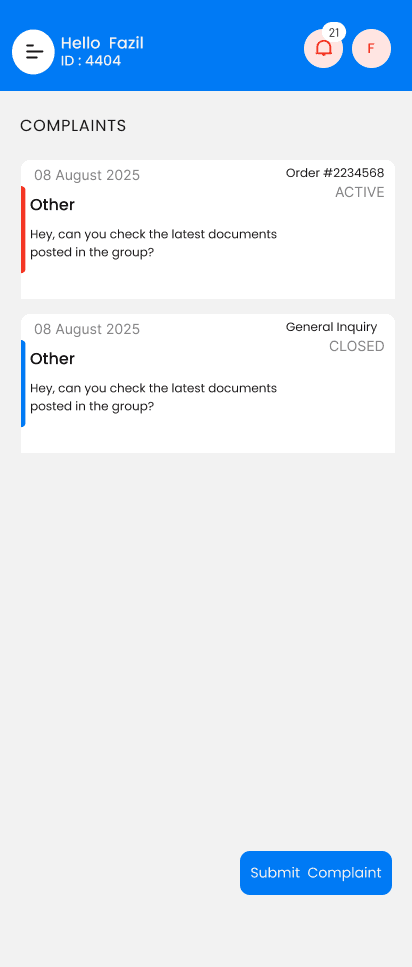
• Order history & complaints
• Login & splash
• Full task lifecycle UX
Goal
Make deliveries smoother and reduce operational friction by redesigning the core partner workflow.
The Core Problems
Partners struggled with
• Confusing dashboard with too many scattered metrics
• Slow task acceptance flow
• No clear visibility of delivery progress
• Small and unusable map
• COD limit not visible causing task rejections
• Hard-to-understand earnings
• Difficult access to complaint submission
• Poorly structured order history
• UI not optimized for sunlight/outdoor usage
• High cognitive load during peak hours
UX Objectives
• Reduce task acceptance time
• Improve real-time navigation clarity
• Make COD handling transparent
• Simplify earnings view
• Increase partner confidence with clear progress indicators
• Create an easy-to-understand and predictable flow
• Reduce support calls & operational issues

Redesigned Solution Overview
The redesigned Potafo Partner App includes
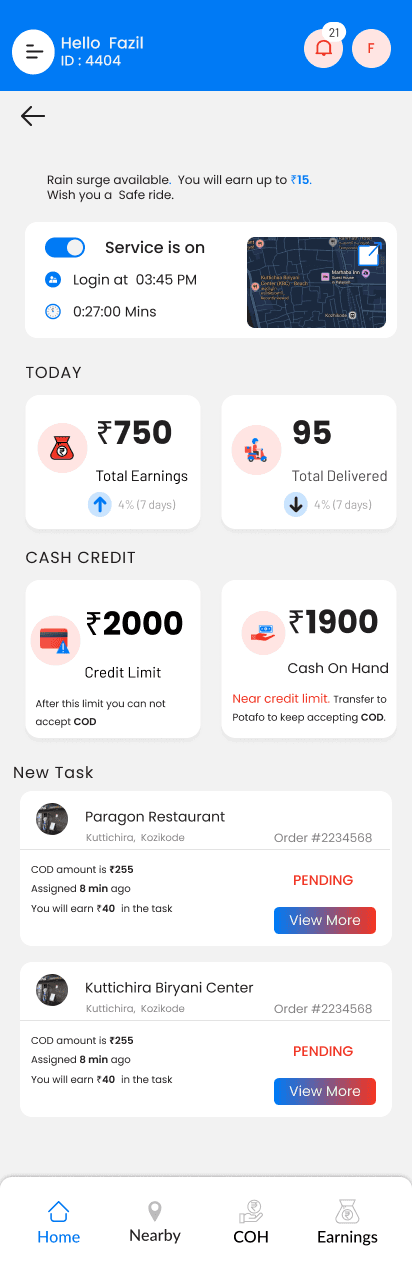
• Clean dashboard with real-time status
• Big and accessible task cards
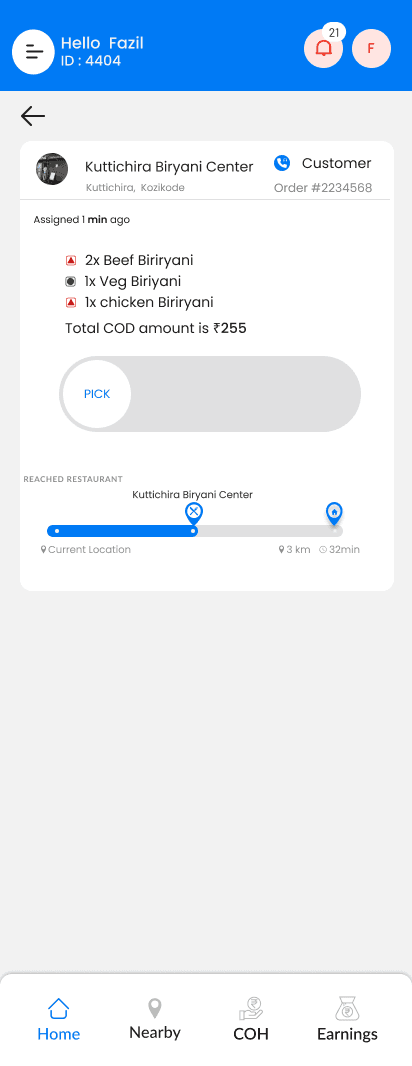
• Slide-to-accept mechanism
• Blue progress bar for normal timeline
• Red progress bar for delay
• Expandable full-screen map
• Detailed COD and Cash-on-Hand visibility
• Smart earnings filter
• Streamlined order history + complaint button
• Smooth service ON/OFF flow with location permission UX
UX Improvements
Before → After
• Cluttered dashboard → Clear vertical structure
• Confusing task cards → Clean, readable cards
• No progress → Visual timeline progress bar
• No delay info → Red delay indicator
• Tiny map → Full-screen map
• Hidden COD limit → Highlighted COD & cash on hand
• Messy earnings → Clear list with filters
• Hard-to-find complaints → One-tap complaint button
Design Principles Used
• Reduce cognitive load
• Clarity over decoration
• Context-driven UI
• Large touch areas for outdoor use
• Strong contrast for sunlight visibility
• Progressive disclosure
• Minimize partner anxiety with transparent status indicators
• High accessibility
• Predictable flow to avoid mistakes
Entire UX Flow
1. Splash & Login
Problems
• Outdated UI and slow access.
Redesign
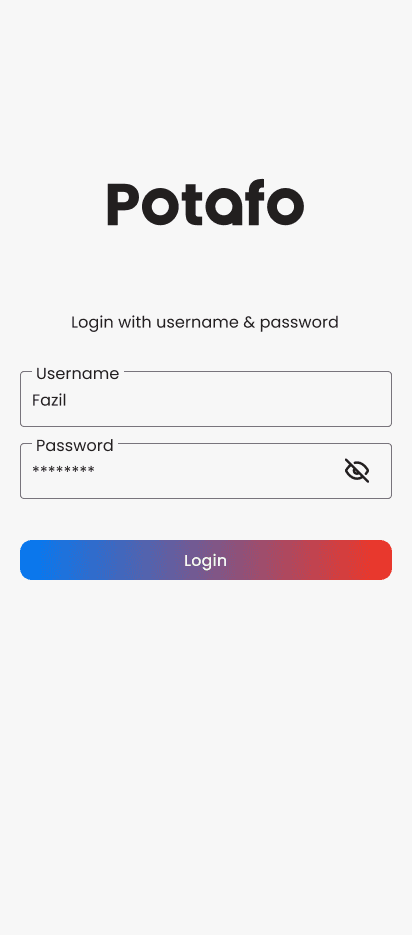
• Modern splash gradient
• Simple username/password login
• Clean visual hierarchy
• Large tappable login button
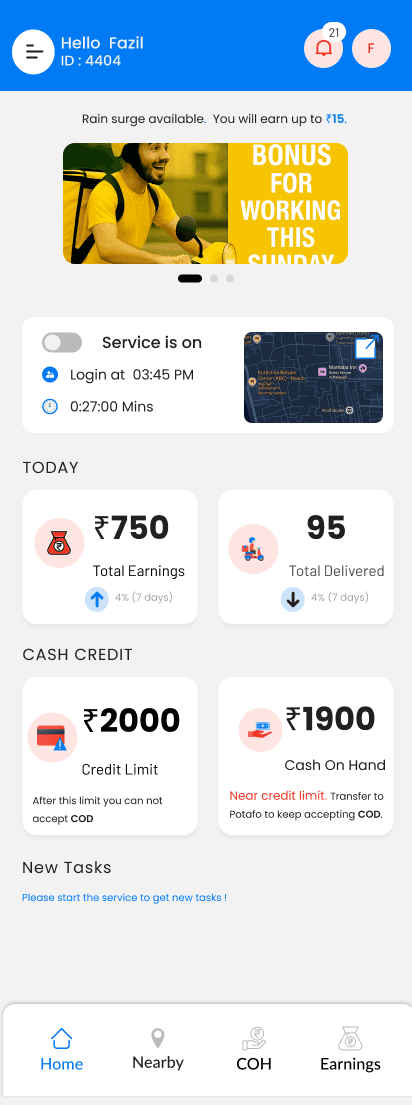
2. Dashboard — Service Off State
Problems
• Hard to understand where to start
• No clear CTA
Redesign
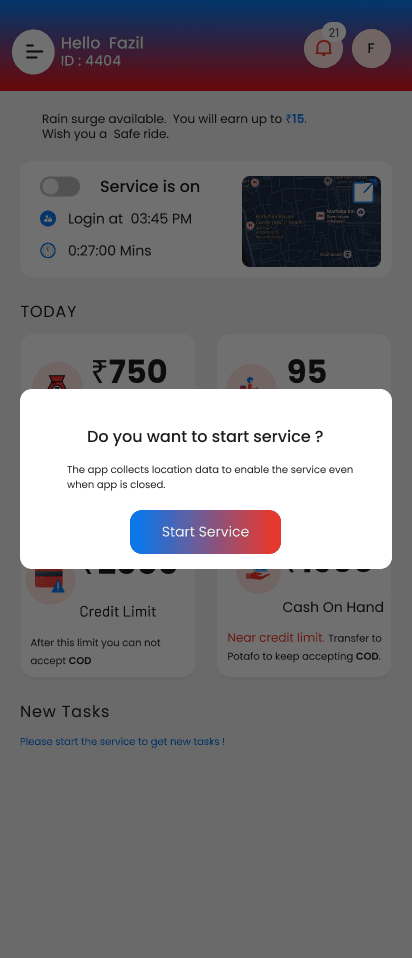
• Clear “Service is off” messaging
• Large toggle to start service
• Informational banner about earnings or surge
• Quick stats: Today’s earnings, deliveries, COD limit, Cash on Hand
• “Start service to get tasks” prompt
3. Start Service — Permission UX
When partners toggle service ON
• Popup explains background location requirement
• Large CTA: Start Service
• Minimizes fear about misuse of location data
4. Dashboard — Service On State
Enhancements
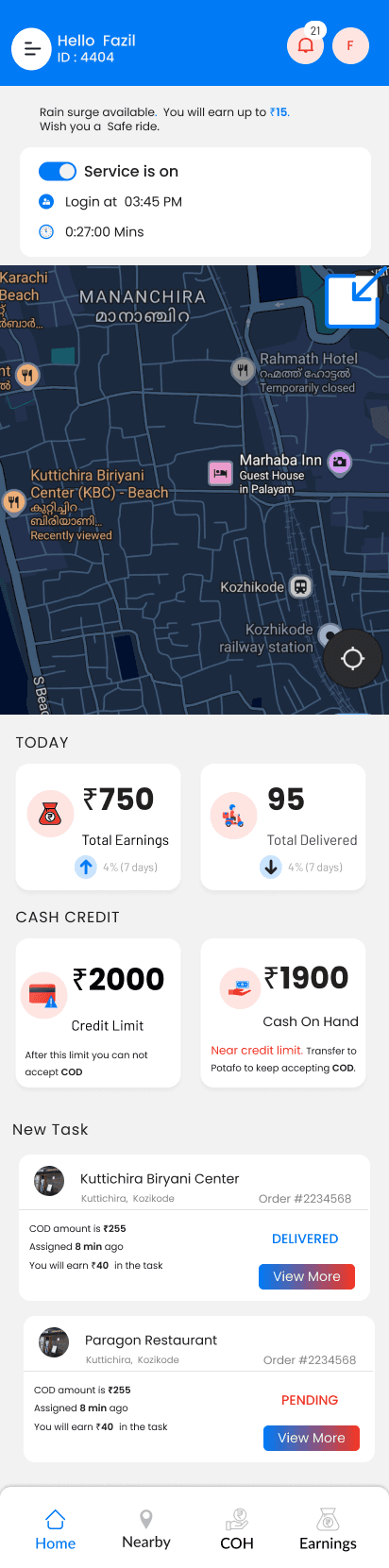
• Map preview showing nearest orders
• Live login time and active duration
• Real-time total earnings and deliveries
• New tasks section instantly appears
5. New Tasks
Each task card shows
• Restaurant / Mart name
• Customer details
• Order ID
• COD amount
• Assigned time
• Earning breakdown
• Button: View More
• Clear status (Pending/Delivered)
6. Expandable Map
Purpose
Partners wanted easier navigation.
Features
• Full-screen map mode
• Floating close button
• Cleaner route visuals
7. Task Acceptance — Sliding Interaction
Old Problem
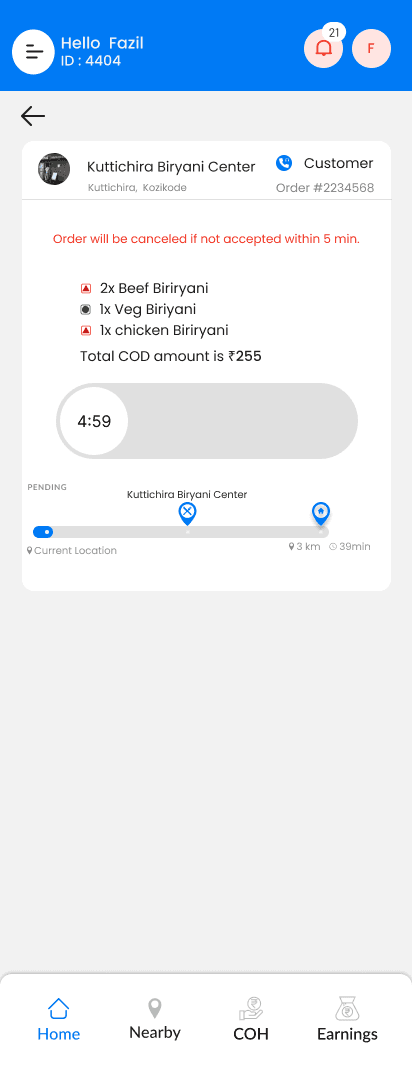
Partners accidentally clicked ACCEPT.
Solution
• Slide-to-Accept button for deliberate action
• Countdown timer for cancellation window
• Item list clearly shown
• COD amount highlighted
• Restaurant distance + ETA
8. Delivery Progress Flow
Normal Progress (Blue Bar)
• Shows partner is en route
• Blue progress bar moves from current location to restaurant/customer
• ETA and distance provided
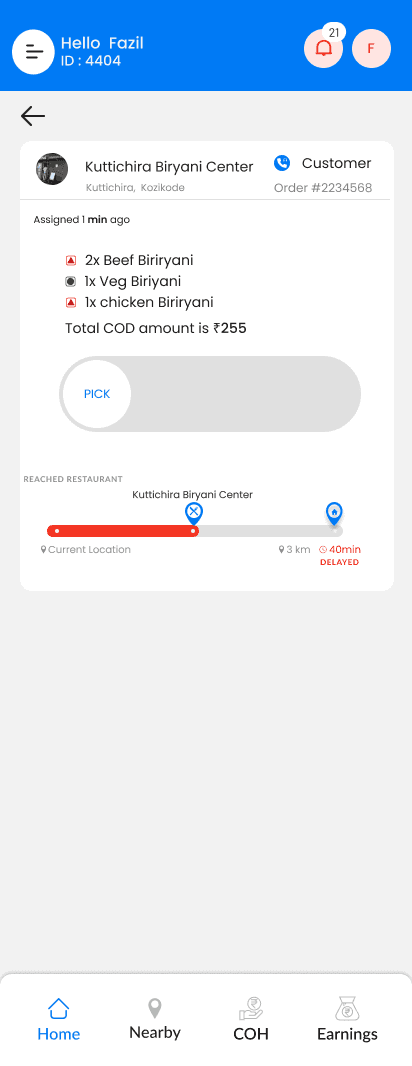
Reached Restaurant
• Partner taps “PICK”
• Moves to next delivery state
Delay State (Red Bar)
• Bar automatically turns red when delayed
• “40 min DELAYED” tag displayed
• Draws attention to urgency
• Encourages faster completion
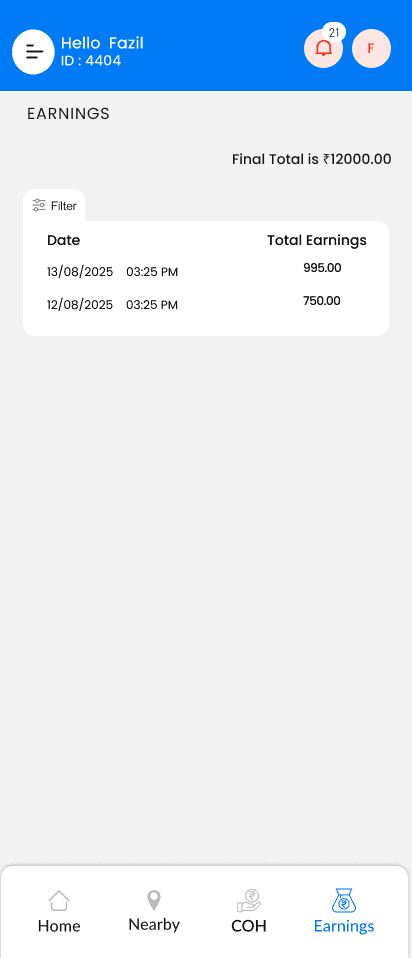
9. Earnings Screen
Problems
Partners couldn’t track how much they earned each day.
Redesign
• Final total at the top
• Earnings listed by date
• “Filter by” added for better control
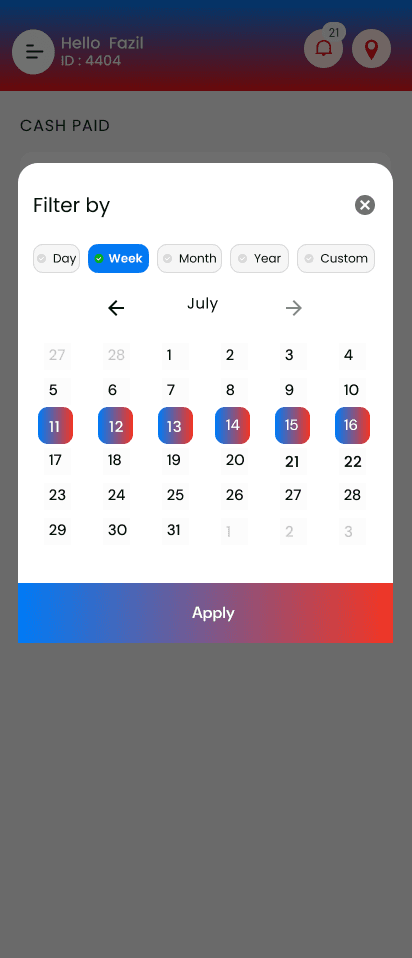
Date Filter Options
• Day
• Week
• Month
• Year
• Custom
• Calendar highlights active selections
• Gradient “Apply” button
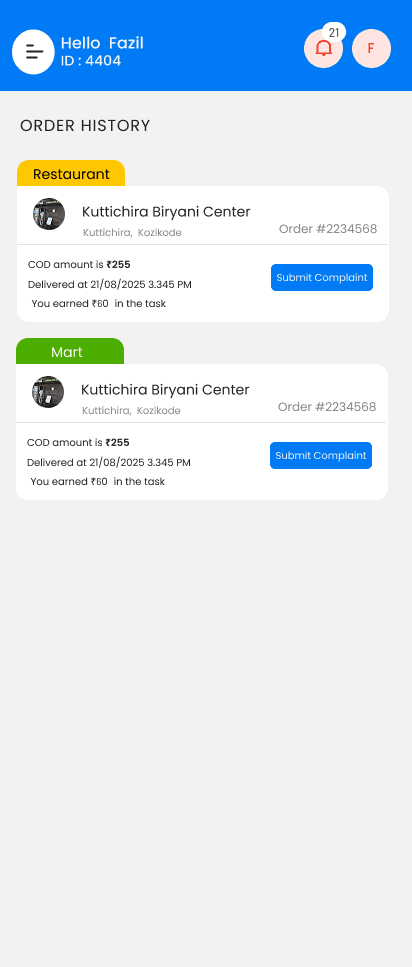
10. Order History
Split by
• Restaurant
• Mart
Each order card shows
• COD amount
• Delivery date and time
• Task earnings
• “Submit Complaint” button
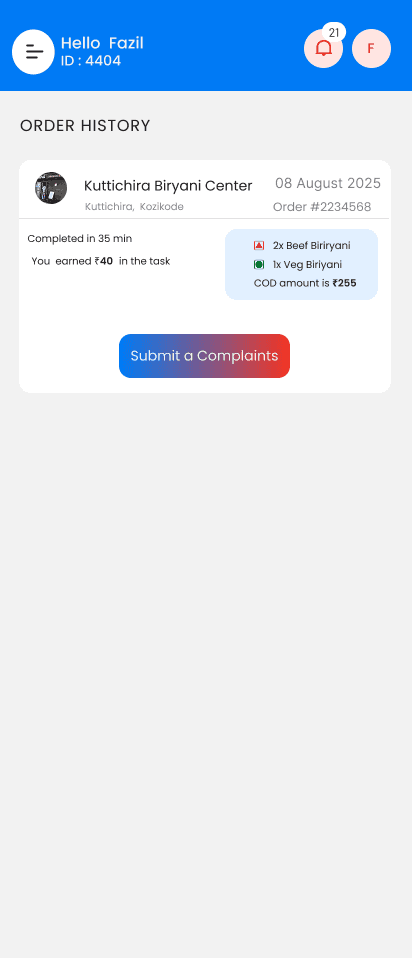
11. Order Detail View
Shows
• Detailed item list (Beef Biriyani, Veg Biriyani, etc.)
• COD amount
• Completion time
• Delivery time
• Button: Submit a Complaint
Expected Impact
• Faster task acceptance
• Fewer delayed deliveries
• Improved partner satisfaction
• Reduced COD-related issues
• Better tracking of earnings
• Lower support requests
• Stronger operational efficiency
Summary
I redesigned the Potafo Delivery Partner App to create a faster, clearer and more efficient delivery experience with a structured task flow, real-time progress tracking, smart COD visibility, and simplified earnings and history management.